Your Claude Code usage,
at a glance.
The essential companion for Claude power users. Monitor your rate limits in real-time with a native macOS widget that lives right on your desktop.
Tailored to your desktop
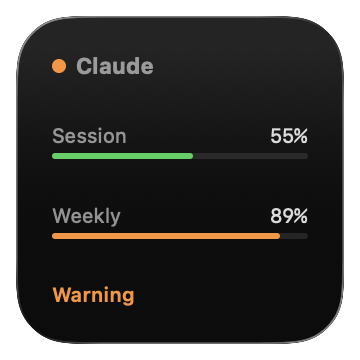 Small
Small
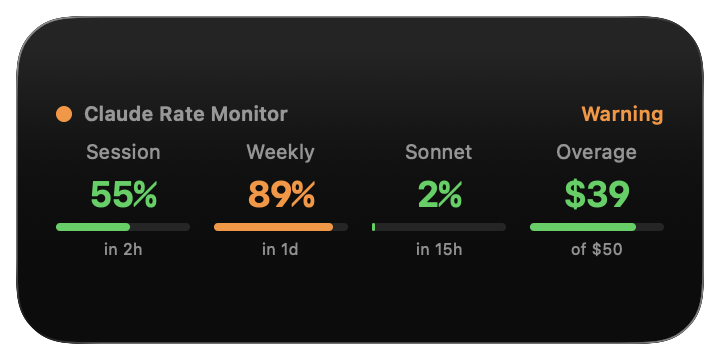 Medium
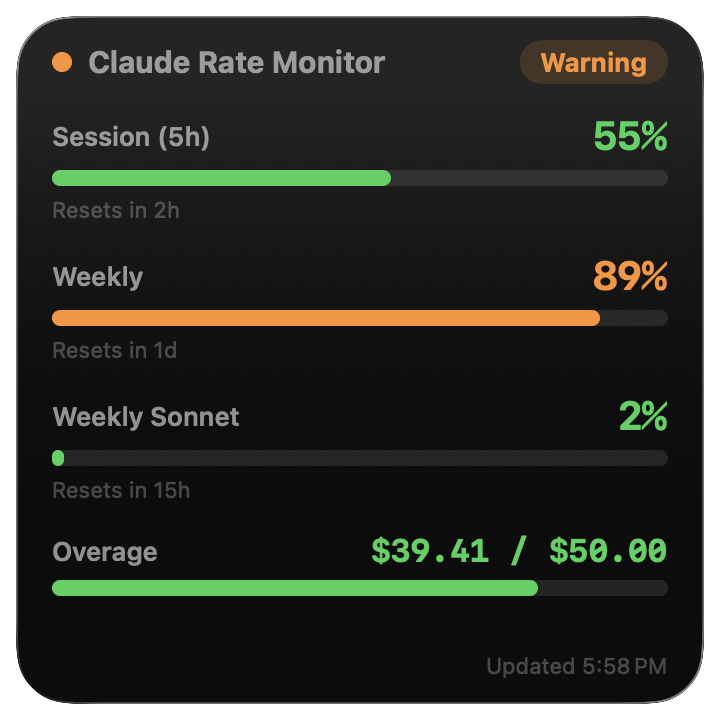 Large
Large
Everything You Need to Manage Claude Code Rate Limits
Stay informed about every dimension of your API usage without leaving your desktop.
See All Your Limits at Once
Session (5h), Weekly, Weekly Sonnet, and Overage -- every rate category in a single view, so you never have to guess which limit you're approaching.
Know When Limits Reset
Live countdowns for every rate category so you can plan your work around resets instead of waiting and refreshing.
Fits Your Workflow
Small for a quick status check, Medium for a side-by-side overview, or Large for full details -- pick the size that suits your desktop.
Spot Problems Before They Hit
Green means you're clear, orange warns you at 80%, and red means you've been rate limited. One glance tells you everything.
Zero Configuration
Sign in with your Anthropic account via secure OAuth. No API keys to manage, no config files to edit -- just log in and go.
Always Up to Date
Refreshes automatically every 15 minutes via WidgetKit, so your rate limit data stays current without any manual effort.
Real-time Visualization
Track session, weekly, and overage categories with native precision.
Up and Running in Seconds
Install with Homebrew and start monitoring your Claude Code rate limits.
Homebrew
brew install hulryung/tap/claude-rate-widget
One command to install. Run brew upgrade claude-rate-widget to update.
Manual Download
Download the latest DMG from GitHub Releases and drag the app to your Applications folder.
After Install
Launch App
Open Claude Rate Widget from your Applications folder.
Log In
Authenticate with your Anthropic account via OAuth.
Add Widget
Right-click your desktop and add the widget from the gallery.